 DesktopAlive
Do animated desktop programs slow down your PC? How to check
26 November 2026
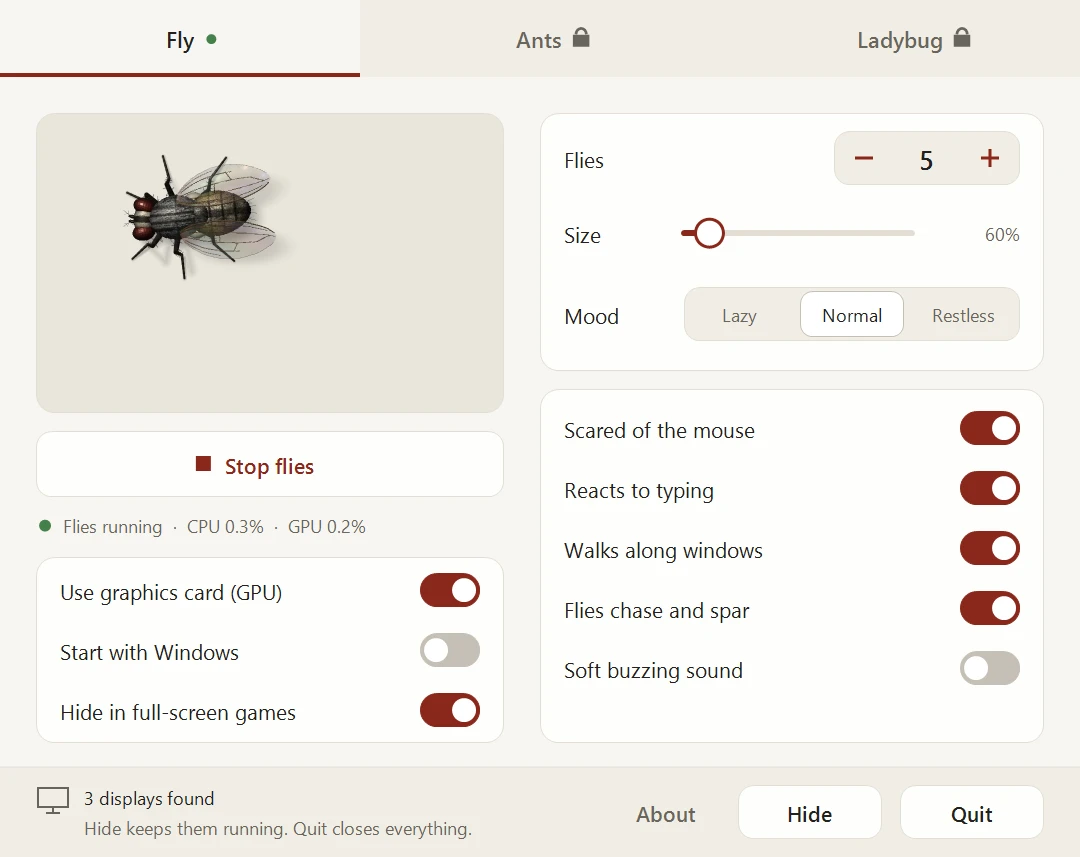
Anything that moves on your screen has to be drawn again and again. So it is fair to ask what an animated desktop program costs. You do not need to trust a claim on a website, ours included. Windows can show you.
Measure it in two minutes
- Press Ctrl + Shift + Esc to open Task Manager.
- Close what you are not using and wait about thirty seconds for the numbers to settle.
- Find the program in the list of processes. Look at the CPU, Memory and GPU columns. If GPU is missing, right-click the column headings and turn it on.
- Stop the animation and watch the numbers again. The difference is what the animation costs.
Look at the Desktop Window Manager too. It puts the final picture on your screen, so part of the work can appear under its name.
What the numbers mean
CPU is shown as a share of the whole processor. One percent on a processor with 16 threads is about a sixth of one thread. The same program shows a larger number on an older PC with fewer threads.
GPU load from a small animation is usually low, but the percentage can look bigger when the graphics card slows its clock to save power. The same work is then a larger share of a smaller total.
Memory matters mainly if your PC is already close to full.
On a laptop
Constant drawing can keep the processor and graphics chip from resting, and that uses battery. If you need the longest battery life, stop the animation while unplugged.
What Makkhi used on our PC
On our test PC (24 threads, RTX 3070), five flies used about 0.1% CPU and 1.5% GPU. That is one PC, and yours will differ, so the Makkhi window shows its own live CPU and GPU use while the insects walk. When you press Stop, CPU use falls to zero.
The fly is free, so you can try it and measure it on your own PC before paying for anything.